Where is my shuttle? How employee shuttle tracking works
Employees can answer "where is my shuttle?" from their own phone thanks to live location, estimated arrival, an "I won't be riding" notice and QR boarding. We explain how the system works and what to watch for in terms of data privacy and KVKK.
The most practical answer to "where is my shuttle?" is for employees to see the live location of their own shuttle vehicle and the estimated arrival time at their stop on their phone. This requires an employee shuttle tracking system that combines location data from the vehicle with line, stop and trip information. In this article, we explain what such a system offers employees, how it works behind the scenes and what to keep in mind on the privacy side.
Why does "where is the shuttle?" matter so much?
Whether it is a hospital, a university, a factory or a public institution, every organization that runs shuttles sees a similar picture in the mornings. Employees wait at the stop, the shuttle is a few minutes late and the phones start ringing: first the driver, then the shuttle company, and finally administrative services or the operations unit.
This is not just annoying; it has measurable consequences:
- Uncertainty lengthens waiting time. Employees who don't know when the shuttle will arrive go to the stop early and wait in the cold or the heat.
- The operations team's time goes to the phone. The same question comes from different people dozens of times a day.
- A missed shuttle disrupts the shift schedule. Shift handovers suffer, especially in hospitals and production facilities.
- Empty seats go unnoticed. When nobody knows in advance who won't be riding, the vehicle waits at stops unnecessarily.
Employee shuttle tracking lets employees answer most of these questions themselves.
What do employees see?
A well-designed employee portal brings everything about the shuttle together on a single screen. RotaMerkezi's employee portal is an example of this approach:
- My shuttle: today's and tomorrow's shuttle, stop and planned time.
- Live location and estimated arrival: once the shuttle sets off, the vehicle's location on the map and the estimated arrival time at the stop.
- "I won't be riding" notice: if an employee won't use the shuttle that day, they report it and can withdraw the notice before the shuttle starts. This information contributes to capacity planning.
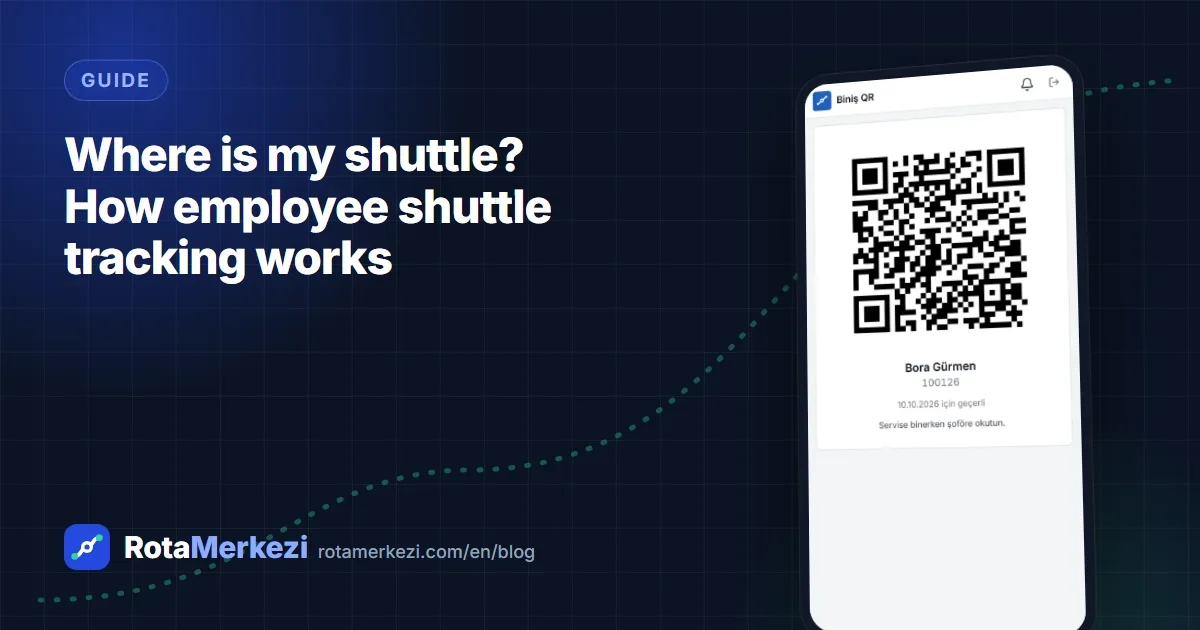
- Boarding QR code: a signed personal QR code that changes every day. Because a screenshot is invalid the next day, it cannot be copied and reused.
- Requests: requests such as a stop or line change or the need for a new shuttle.
- Notifications: instant notifications for delays, route changes and announcements.
The portal runs as a web app (PWA) that can be added to the phone's home screen; it requires no installation from an app store.
How does it work behind the scenes?
The single dot and arrival time an employee sees on screen is actually the result of several layers working together.
1. Location source: GPS device or driver app
The vehicle's location can come in two ways:
| Location source | How does it work? | When is it suitable? |
|---|---|---|
| In-vehicle GPS device | The device sends its location regularly via HTTP or MQTT | If the fleet already has GPS devices or vehicles are equipped with the vendor's devices |
| Driver app | The driver's phone sends location during the trip | If vehicles have no device or a quick start is desired |
In other words, live tracking does not necessarily require installing hardware in vehicles. In RotaMerkezi, if a vehicle has no GPS device, the driver app is used as the location source; in areas where the connection drops, the app queues actions and sends them once the connection returns.
2. Linking the location to the trip
Raw location data on its own only says "the vehicle is at these coordinates." What matters to the employee is "when will my shuttle reach my stop?" For that, the location must be matched with the following information:
- which trip the vehicle is running at that moment,
- which line and which direction (inbound / outbound) the trip is on,
- the line's stop sequence and planned stop times,
- which stop the employee is assigned to.
3. Estimated time of arrival (ETA)
The estimated arrival time is calculated from the vehicle's current location, the remaining distance on the route and planned driving times, and it is updated continuously as the vehicle moves. The estimate can change because of traffic or unexpected stops; that is why the ETA is a continuously updated estimate, not a firm promise.
4. The operations side: alerts
The same data also works for the operations team. On the live vehicle tracking screen, all shuttles are monitored on the map; an alert is generated when a delay threshold is exceeded, when a vehicle leaves its planned route or when no location has been received for a certain time. This way the team can notice a problem before an employee calls.
Why do QR boarding and the "I won't be riding" notice matter?
Live location answers "where is the shuttle?"; boarding data answers "whom did the shuttle carry?"
- QR boarding: the employee has the driver scan their daily QR code. A corporate card / NFC or manual check-off by the driver are also options. This makes it possible to measure how full each line actually runs.
- I won't be riding: absences reported in advance reduce pointless waiting by the driver and, in the long run, provide data for line occupancy and capacity decisions.
Together, these two data sets ensure that decisions such as merging lines or changing vehicle types are based on actual use rather than guesswork.
Privacy and KVKK: who is being tracked?
When employee shuttle tracking comes up, the most common question is: "Is the employees' location being monitored?" In a properly designed system, the answer is no.
- The vehicle is tracked, not the employee. Location data belongs to the shuttle vehicle and is collected during the trip.
- Employee addresses are for planning. The registered address is used for stop and line planning; employees' real-time location is not collected.
- Boarding data should be used only for its purpose. In RotaMerkezi, for example, boarding data is not reported per person for punitive purposes; it is used as aggregate statistics.
- Access should be limited by permissions. Who can see which data should be defined by role and department, and critical actions should be written to an audit log.
Law No. 6698 on the Protection of Personal Data (KVKK, Turkey's data protection law, comparable to the GDPR) requires personal data to be processed for specific, explicit and legitimate purposes, in a manner that is relevant to and proportionate with those purposes. When setting up shuttle tracking, we recommend assessing matters such as privacy notices and retention periods together with your organization's legal department or data controller. This section is for general information and does not replace legal advice. For the measures on the platform side, see the security and privacy page.
Checklist before you start setup
- Do the vehicles have GPS devices, or will the driver app be used?
- Are lines, stops and employee–stop assignments up to date?
- How will employees access the portal (enterprise sign-in, invitation, a temporary password set by an administrator)?
- Which method will be used to record boarding: QR, card, manual check-off?
- Who will receive delay and deviation alerts, and at what threshold?
- Are the privacy notice and internal announcement ready?
Conclusion
When employees can answer "where is my shuttle?" themselves, waiting uncertainty decreases, the operations team deals with exceptions instead of phone calls, and empty seats become visible. If you are curious what this would look like in your own shuttle network, you can request a demo or explore the live vehicle tracking feature.
Frequently asked questions
Is it necessary to install GPS devices in vehicles for shuttle tracking?
No. If a vehicle has a GPS device, location can be taken from the device; if not, the driver app on the driver's phone can be used as the location source. In both cases, live location and estimated arrival can be calculated.
Do employees need to download the shuttle tracking app from an app store?
Not with RotaMerkezi. The employee portal and the driver app are web apps (PWAs) that can be added to the phone's home screen, and they work on Android and iOS.
Does shuttle tracking mean monitoring employees' location?
No. What is monitored is the location of the shuttle vehicle during the trip. The employee's registered address is used only for stop and line planning.