New module: one file for shuttle vehicle accidents, from report to closure
RotaMerkezi now has an accident and damage management module. Drivers report accidents from the scene with photos and location; reports, insurance, expenses and documents are tracked in one file, and if the vendor is at fault the amount is reflected in the vendor payment.
Nobody wants it to happen, but in a shuttle network that covers hundreds of kilometers every day, an accident will occur sooner or later: a rear-end collision, a scrape against a parked car, a side impact at an intersection. In that moment, people come first; the process that follows, however, is usually scattered. Photos stay on the driver's phone, the accident report goes into a folder, insurance correspondence lives in email and expenses in a spreadsheet. Months later, nobody has a complete answer to "what did that accident cost, whose fault was it, and did we charge it to the vendor?"
The accident and damage management module, introduced in RotaMerkezi version 1.8, brings this process together in a single file, from the scene of the accident to closure.
At the scene: safety first, then a few taps
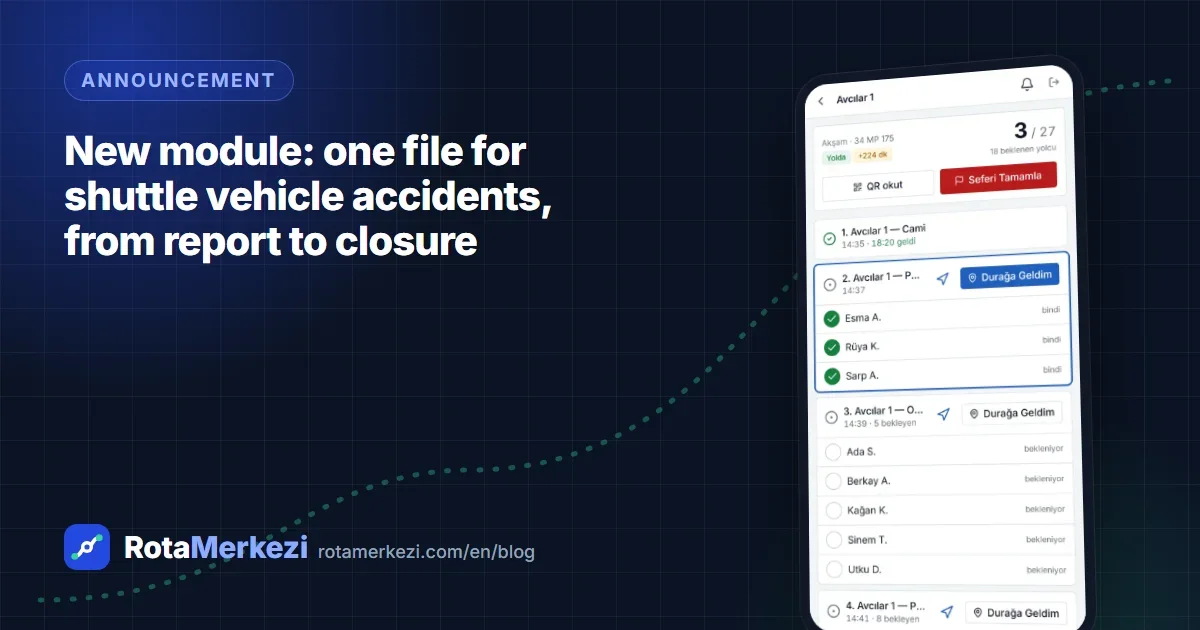
The driver app has a red Report accident button. The screen first reminds the driver about personal safety and calls 112 (Turkey's emergency number) with a single tap. Then the driver only has to answer a few questions:
- Is anyone injured? Have the police or an ambulance been called?
- Did the shuttle vehicle hit something, or was it hit? What type of accident was it?
- The other vehicle's license plate, and can the vehicle continue its journey?
- Photos: taken with the camera or added from the gallery.
The location is taken automatically from the device. Trip, line, vehicle, driver and vendor information is already in the system, so it doesn't have to be entered again. If the accident happened during an ongoing trip, the passengers on board are derived from boarding records; the operations team knows within the first minute whom to check on.
As soon as the report is sent, a high-priority incident is opened (critical if someone is injured or an ambulance was called), and an instant notification goes to the people with accident management permission.
In the office: the accident file
On the Operations → Accidents screen, every accident is a numbered file (e.g. KZ-2026-0001). The file contains:
- Incident details: time, location, type of accident, weather, road and lighting conditions
- Official process and insurance: report type and number, insurance and comprehensive (kasko) claim numbers, loss adjuster, party at fault and degree of fault
- Other parties: vehicle, pedestrian or property; license plate, owner, insurance, damage
- Injuries: passenger, driver or third party; severity, treatment, hospital
- Expenses and recoveries: repair, replacement vehicle, towing, legal fees, compensation and recoveries from insurance, giving the net cost
- Documents: photos, accident report form, police report, loss adjuster's report, invoices, statements
- Timeline: notes and status changes
The file moves through the steps reported, under review, insurance, repair and closed. A note is required when closing, and the linked incident is resolved automatically. A PDF summary with photos can be produced with one click for the insurer, the loss adjuster or management.
Every organization's process is different
A hospital's post-accident steps are not the same as a factory's. That is why we designed the module not as a fixed form but as a structure the organization can configure:
- Checklist: it comes with ready-made steps such as "Passengers' condition checked," "Accident report obtained," "Damage claim filed with the insurer" and "Driver's written statement taken." The organization adapts the list to its own process; each file shows who checked off each step and when.
- Custom fields: fields can be added to the accident file for organization-specific information, such as an internal incident number, the person who took the damage photos or whether a workplace accident notification was filed.
- Module: accident management can be switched on or off per organization.
Vendors and vendor payments
Employee shuttles are mostly run by vendor companies. If the vendor is at fault, the amount to be charged is set in the file, and this amount is entered as a deduction from the vendor payment for the month in which the accident occurred. Once the vendor payment has been approved, the amount can no longer be changed; this way, later corrections do not conflict with the vendor payment.
The accident report, added to the ready-made reports, lists the accidents in a period by line, vehicle, driver, vendor, severity, number of injured, fault and net cost. The report can be exported to Excel or PDF and, if desired, sent regularly by email. Seeing on which line, at what time and in which vehicle accidents cluster is also the starting point for preventive measures.
Health data is protected separately
An accident file can contain health information, which is special category personal data under KVKK (Turkey's Personal Data Protection Law, comparable to the GDPR). That is why:
- Injury information is stored encrypted and can only be seen with a separate permission ("view injury details"). Health details are not written to the audit log.
- Once the file is closed and the retention period set by the organization (10 years by default) has expired, names, hospitals and notes are anonymized.
- The other driver's name and phone number are stored encrypted; location information embedded in photos is removed.
- Every document view and PDF export is written to the audit log.
- A vendor representative sees only accidents involving their own vehicles.
We covered in detail how location and health data should be protected in shuttle management in our article on KVKK.
How to get started
The module has been added to the existing packages. The organization administrator can adapt the checklist to their own process from the Operations → Accidents screen and define organization-specific fields under Settings → Custom fields → Accident file. Drivers will see the Report accident button in the app the next time they open it.
To see the module with your own lines and vendors, you can request a demo.
Frequently asked questions
Can an accident be reported if the driver has no internet connection?
Accident reporting requires a connection because it uploads photos. If there is no connection, the driver can call the operations team; the accident file can also be opened from the office and photos added later.
Can only the driver open an accident file?
No. Users with accident management permission can also open a file from the Operations → Accidents screen; for example, if the accident was reported by phone or happened outside a trip.
Who can see injury information?
Only roles that have been given the "view injury details" permission. Users without this permission see only whom the injury involves (passenger, driver, third party) and its severity in the file; they do not see names, hospitals or notes.
How is the cost of an accident charged to the vendor?
If the vendor is at fault, "charge to vendor" is selected in the file and the amount is entered. The amount is added as a deduction item to the vendor payment for the month in which the accident occurred.