Employees and mobile
Driver app
Drivers see their daily tasks, stop sequence and expected passengers on their phone and record boardings by QR, NFC or a single tap. It works even without a connection.
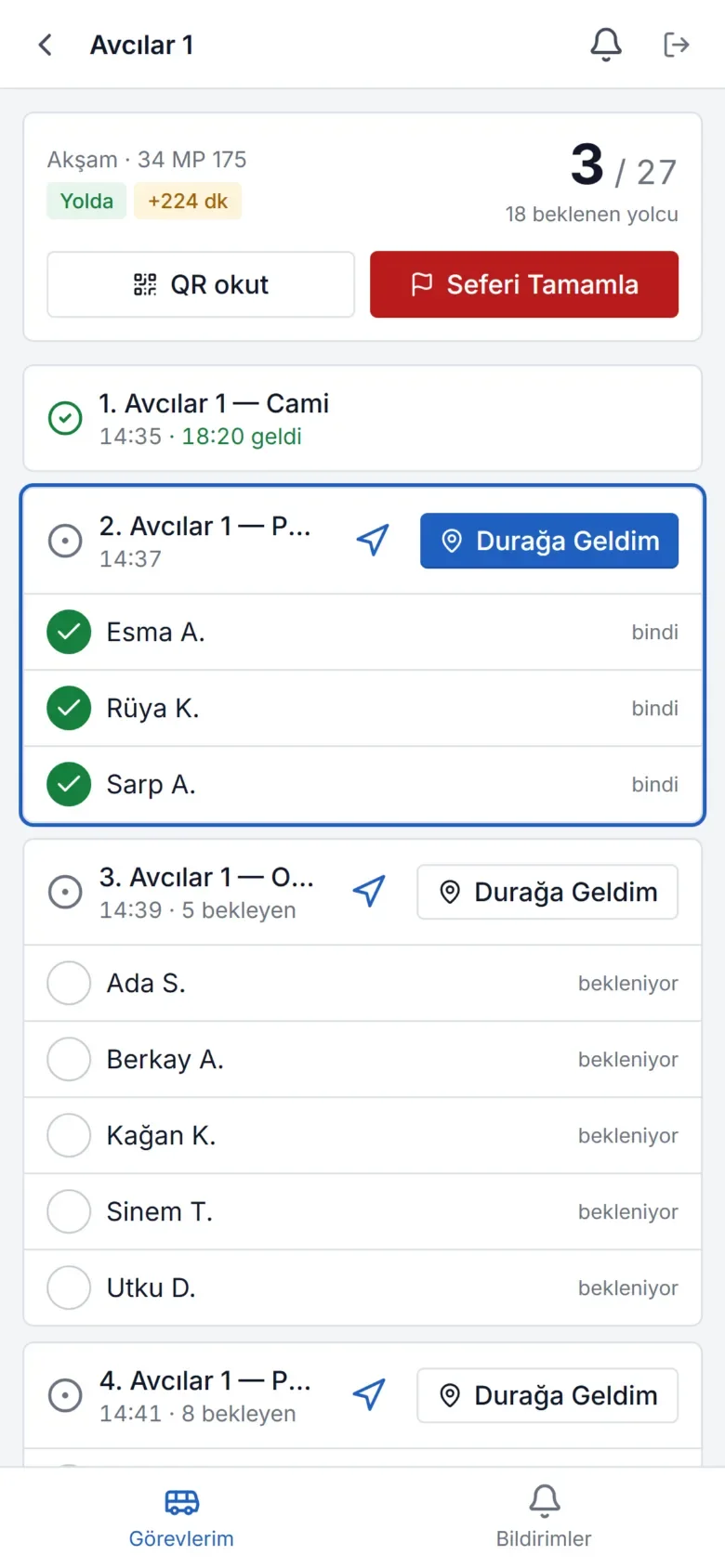
The most important link in the field
The driver app is an app that can be added to the phone without installing it from a store (PWA). It works on Android and iOS.
- My tasks: The day's trips, vehicle and line details
- Arrived at stop: Arrival record and the list of passengers expected at the stop
- Boarding: Scan the employee's daily QR code, use NFC / a corporate card, or mark manually
- Navigation: Directions to the next stop via a map app
- Offline: In a tunnel or an area without coverage, actions are queued on the device and sent when the connection returns
The app is also a location source, so organizations without GPS devices in their vehicles can still do live tracking.
How a trip flows
- The driver opens the app and sees the day's trips.
- Start task puts the trip "on the road". If the vehicle has no tracking device, the phone's location is sent from this moment.
- At each stop, Arrived at stop records the arrival; the list of passengers boarding at that stop (with shortened names) is shown.
- Boardings are recorded by QR scan, NFC card or ticking them off the list. The on-board passenger counter (e.g. "17 / 27") updates instantly.
- Complete trip closes the trip. Expected passengers who did not board are recorded as aggregate statistics.
Works even without a connection
When the driver is in a tunnel, on a rural road or out of coverage, the app keeps working. Boarding, stop arrival and location records are queued on the device and sent in the same order once the connection returns. Each action carries a unique ID, so it is never counted twice even if it is sent again.
Boarding methods
- QR: The employee's personal code, which changes daily in their portal, is scanned with the camera. On devices whose camera does not support it, the code can be entered manually.
- NFC: A corporate card or NFC tag is tapped on the phone (on supported Android browsers).
- Manual: Ticking off from the passenger list with a single tap.
- On-board reader: In vehicles with a card / RFID reader, boarding is taken directly from the reader.
Simple for drivers, secure for the organization
A driver account sees only its own trips and cannot access management screens. Access is granted in one step from the driver record, and a password can be set. When access is removed, the account is deactivated. The phone's location is sent only while a trip is on the road.
Frequently asked questions
Does the driver app need to be downloaded from the App Store or Google Play?
No. The app is a web app opened in the browser and added to the phone's home screen (PWA). It works on Android and iOS, can receive notifications, and updates arrive automatically.
Are boardings lost if the internet connection drops?
No. Actions taken offline are queued on the device and sent in the same order when the connection returns. Each action is unique, so no duplicate records are created.
Does the driver's phone send its location all the time?
No. The phone's location is sent only after a trip has started and until it is completed. No location is collected outside trips.
Does the driver see passengers' personal information?
The driver sees only the shortened names (first name and initial of the surname) of passengers on their own trip and which stop they will board at. Addresses and contact details are not shown.