Live operations
Trip and operations management
Daily trips are generated automatically from the shift calendar and public holidays, while vehicle and driver changes and incidents are managed from a single screen.
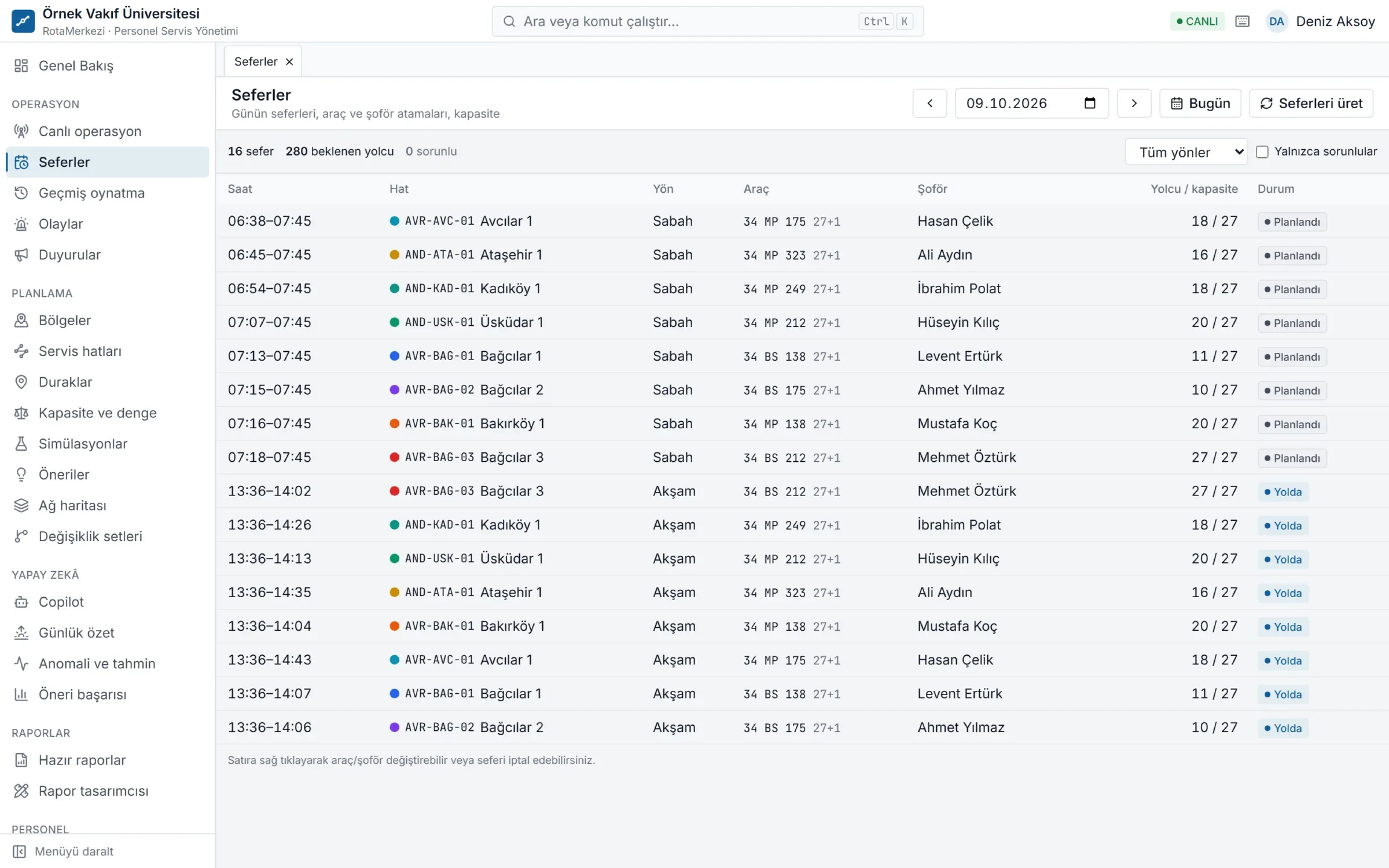
Ready every day, on its own
Trips are created automatically from line versions, the shift calendar, public holidays and the organization calendar. During the day, the operations team only deals with exceptions.
- Vehicle and driver changes, extra trips, cancellations
- Incident management: records of breakdowns, accidents and delays, and the resolution process
- Announcements: bulk notices to employees on a specific line or in a specific unit
- Rules engine: no-code rules such as "notify the operations manager if occupancy exceeds 90%"
How does trip generation work?
Every night, trips for the coming days (14 days by default, an organization setting) are recalculated:
- No trips are generated on holidays and closed days.
- The line's default vehicle and driver are copied to the trip.
- Expected passengers are taken from the assignments; employees who are on leave, working remotely, have no work schedule that day or have reported "I won't ride" are excluded.
- Trips that have not started are updated, but manual changes made during the day are preserved.
- When an assignment, vehicle or line version changes, the trips of the affected line are recalculated immediately.
Trips screen
- Date picker and a summary of the day; option to show only problem trips (no vehicle, no driver, over capacity)
- Right-click a row to change the vehicle, change the driver or cancel
- In the candidate list, vehicles with insufficient capacity, vehicles and drivers already assigned to another trip at the same time, and drivers on leave are flagged and cannot be selected
- Trip details show stops and times, expected passengers and assignment history
Preparing for tomorrow and the morning summary
Every evening a "tomorrow readiness" check and every morning a "daily summary" are prepared: trip counts, first departure, expected passengers, trips without a vehicle or driver, over-capacity, drivers on leave, the document status of the vehicles and drivers in use, open incidents and pending suggestions. Problems are visible in the morning before the shuttles set off.
Rules engine
Define "if this happens, do that" rules without writing code. Rules are evaluated daily or live every few minutes, and the outcome can be an incident record, an in-app notification or an email. Examples: an occupancy threshold, recurring delays, document expiry.
Announcements and notifications
You can make announcements to employees on a specific line, campus or unit. Announcements appear in the passenger portal and in in-app notifications; if the organization wishes, they are also sent by SMS, WhatsApp or email. Events such as a vehicle change, a delay or the shuttle approaching are automatically notified to the relevant passengers.
Frequently asked questions
Are trips automatically canceled on public holidays?
Yes. No trips are generated on days marked as a holiday or closed day in the organization calendar. Half days can be defined separately.
If I change the vehicle during the day, will it disrupt the line's plan?
No. A same-day vehicle or driver change affects only that trip. The line's default vehicle and the trips on following days do not change.
Can an unsuitable vehicle be assigned to a trip?
No. Records whose capacity is insufficient for the expected passengers, that are assigned to another trip at the same time or (for drivers) that are on leave are flagged in the candidate list and cannot be selected.
How do trip and incident data feed into reports?
Punctuality, delay, kilometer, occupancy and incident data from completed trips are processed into daily indicators and used in the standard reports, in cost calculations and in vendor payments.