Planning and optimization
Smart passenger assignment and stop suggestions
Place new employees on the best stop and line, with walking distance, capacity and shift fit all weighed together.
The right stop, the right line
The assignment engine scores candidate stops and lines for each employee: walking distance, line occupancy, fit with shift times and ride time. Suggestions can be applied with one click or added to a change set and submitted for approval.
- Automatic suggestions for new hires and address changes
- Capacity protection: no assignment is made to a full line; a warning is shown instead
- Bulk assignment and moving passengers between lines
- Stop suggestions: new stop locations for clusters of employees outside coverage
Which rules are never broken?
Assignment suggestions are chosen only from candidates that meet all of the following conditions:
- Walking distance: The personal limit, or the organization default if none is set, is never exceeded.
- Maximum ride time: Lines above the limit set by the organization are not candidates.
- Destination campus: A line that does not go to the employee's campus is not suggested.
- Shift fit: The morning shuttle must arrive before the shift starts, and the evening shuttle must depart after the shift ends.
- Accessibility: Employees with needs such as a wheelchair are suggested only for lines with suitable vehicles.
Among candidates that meet these conditions, capacity balance, walking, in-vehicle time and stability (not moving existing passengers unnecessarily) are weighted. You can change the weights in the organization settings.
Capacity balancing suggestions
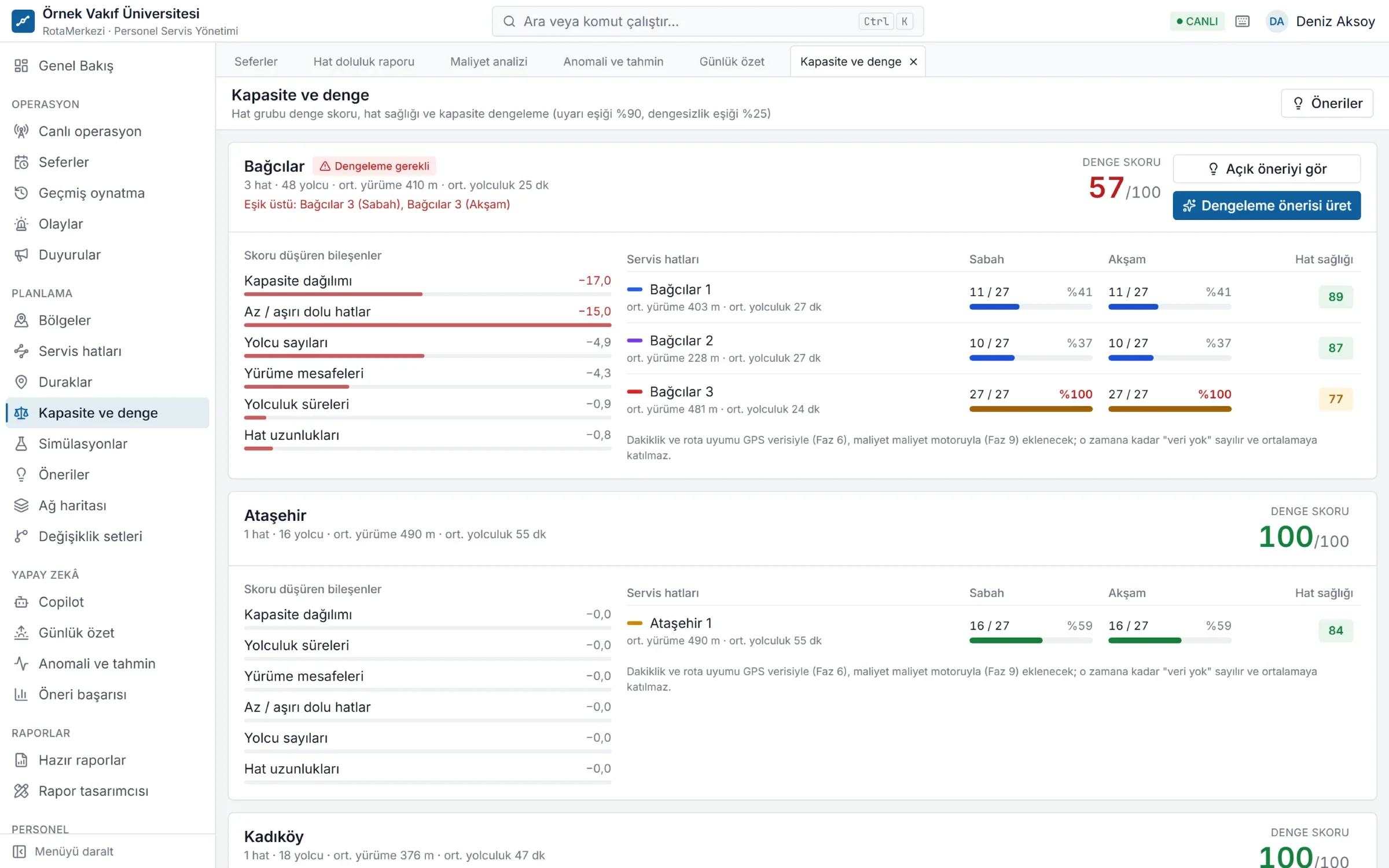
If a line's occupancy exceeds the threshold several days in a row and there is an imbalance between lines in the same area, the system automatically generates a balancing suggestion. It lists the moves that restore balance while moving the fewest people. Each suggestion includes before/after walking and ride times, a confidence score and a rationale. You can accept it as is, remove some moves, or reject it with a written reason.
Stop suggestions
Employees who are not within walking distance of any stop are clustered geographically. The system first looks for a suitable point on an existing line; if it cannot find one, it proposes the cluster center as a new stop location and shows how much of a detour the nearest line would need.
Bulk moves, simulated first
From the passenger list on the line screen you can select several people and move them to another line and stop. Before the move, the new occupancy, balance and any constraint violations are shown; if there are no violations, the moves are added to a change set.
Frequently asked questions
How is a new hire assigned to a shuttle?
When the employee record and address are entered, suitable stops and lines are scored against the rules and an assignment suggestion is created. The suggestion is added to a change set with one click, and after approval the person becomes a passenger on the line from that date.
Can a passenger be assigned to a full line?
No. Capacity is also checked at publication; an assignment that would exceed vehicle capacity cannot be published. In that case, use a balancing suggestion or a larger-vehicle scenario.
What happens if a suggestion is not accepted?
The suggestion is rejected with a reason and recorded. The breakdown of rejected and accepted suggestions, decision time and the impact measured after application are reported in the suggestion success analysis.
How does the assignment engine measure walking distance?
If a provider supporting pedestrian routing is configured, over the road network; otherwise it is estimated by applying a correction factor to the straight-line distance. The method used is reflected in the suggestion's confidence score.