How to take shuttle boarding attendance with QR codes
Employee shuttle boarding checks with QR codes, NFC or corporate cards instead of paper attendance lists. Proper setup, offline operation, the data you gain and privacy principles.
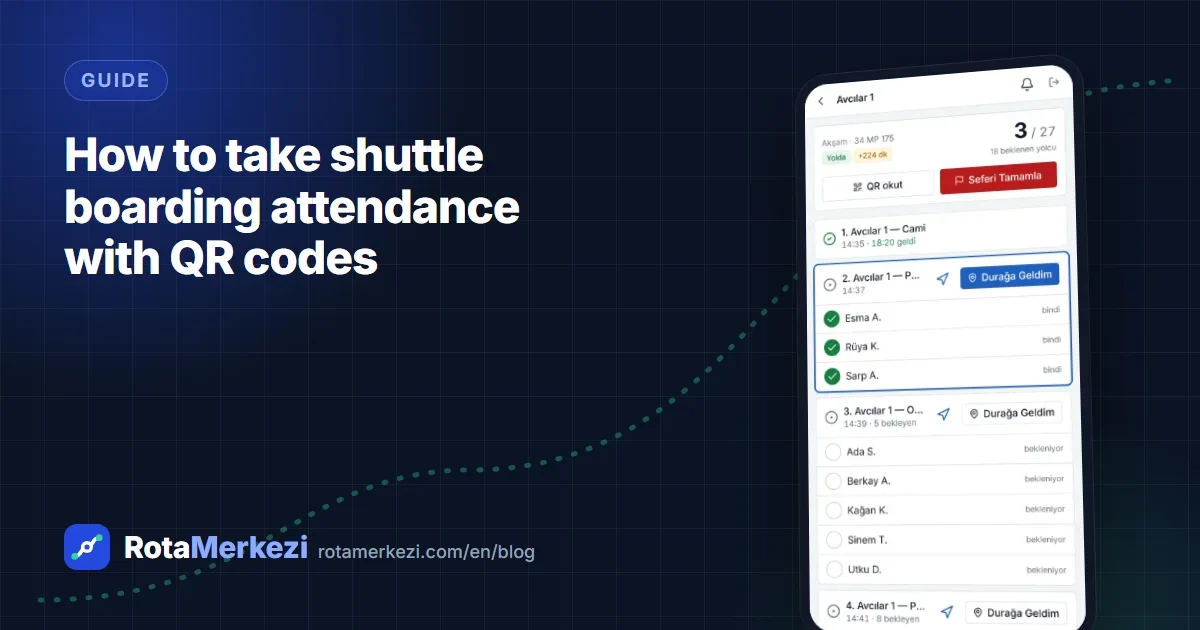
Boarding attendance on employee shuttles means recording who actually boarded which trip, and the most reliable method is to scan the QR code on the employee's phone or their corporate card on the driver's device. Instead of paper lists and "the vehicle was full" claims, every boarding becomes a time-stamped record. In this guide, we explain why manual attendance falls short, how to set up QR- and card-based boarding and how to use the resulting data while protecting privacy.
Why don't manual attendance lists work?
In many organizations, shuttle attendance is still taken on a paper list, or not at all. The consequences are familiar:
- The list is out of date. New starters, leavers and people who change stops are reflected late.
- The driver gets distracted. Checking off a list while driving is both difficult and unsafe.
- The data stays on paper until the end of the month. Someone has to enter it into a computer by hand to analyze it; most of the time this never happens.
- Occupancy is based on guesswork. "This line is full" or "this vehicle runs empty" is based on impressions, not measurement.
- Disputes and verification are impossible. When someone asks whether an employee boarded the shuttle, there is no evidence.
As a result, the organization cannot give a reliable answer to the most basic question about its shuttle network: how many people are actually carried on each line?
Boarding check methods
There are several methods for digital boarding, and they are not mutually exclusive. Most organizations use more than one:
| Method | How does it work? | Advantage | Watch out for |
|---|---|---|---|
| QR code | The employee scans the code on their phone at the driver's device | No extra hardware needed | Must change daily so the code can't be copied |
| NFC / RFID card | The corporate card is tapped on a reader or an NFC-enabled phone | Fast, suitable for employees without a phone | Card numbers must be mapped in the system |
| Manual check-off | The driver checks off from the expected passenger list | Works under any conditions | Should remain a fallback method |
Making the QR code secure
A static QR code can easily be shared via a screenshot. That is why the QR code must be:
- personal,
- changed every day,
- signed (so that fake codes cannot be generated).
This way, yesterday's screenshot is invalid today.
Cards and NFC
If your organization has a card-based access control system, using the same card on the shuttle is the most practical solution for employees. Card numbers can be mapped to employee records through an HR import or a bulk import.
The driver app must work offline
Shuttle lines pass through tunnels, out-of-town roads and industrial zones with weak mobile coverage. A boarding system that depends on a connection will fail at the most critical moment. Features to look for in a driver app:
- Offline queue: boarding records are queued on the device when there is no connection and sent once the connection returns.
- Expected passenger list: at each stop the driver sees who is expected to board and knows who is missing.
- One-tap actions: a large-button interface that doesn't distract while driving.
- Distribution without an app store: being a web app (PWA) that can be added to the phone makes rapid rollout across different device brands easier.
What do you gain from boarding data?
Digital boarding doesn't just make attendance easier; it reveals information about the shuttle network that was previously out of reach.
Actual occupancy
You see how many seats are actually filled on each line relative to vehicle capacity. Lines that consistently run half-empty become candidates for merging or a smaller vehicle; lines that are consistently full need more capacity.
No-shows
Seeing, in aggregate, the employees who are registered but don't use the shuttle brings the assignment list closer to reality. Letting employees send an "I won't be riding today" notice makes this data even more meaningful: the driver doesn't wait in vain, and planning follows actual demand.
Demand forecasting and planning
Boarding history is the most valuable input for line-level demand forecasting and route optimization. When optimization is based on the passengers actually carried rather than registered passengers, the result fits the field better.
Evidence for vendor payments
Boarding records are one of the pieces of evidence that a trip was actually run and passengers were carried; they form a shared data source for vendor payments (progress payments).
Privacy: what should boarding data not be used for?
Boarding data is personal data and can be linked to an individual. For employees to trust the system, its purpose must be clear from the start:
- The privacy notice should clearly state that boarding data is collected for shuttle planning and operations.
- The data should not be reported per person for punitive purposes (e.g. checking arrival times at work); aggregate statistics are sufficient for planning.
- Access to boarding history should be limited to the roles that need it.
- A retention period should be defined for the data.
For details, see the Security and privacy page, which covers KVKK (Turkey's Personal Data Protection Law, comparable to the GDPR). (This section is general information, not legal advice.)
Practical steps for the transition
- Clean up employee data: an up-to-date employee list, stop and line assignments.
- Choose the method: start with QR and add cards at campuses that have card-based access control.
- Pick a pilot line: try it on a few lines for two to three weeks and collect feedback from drivers and employees.
- Inform employees: explain why it is being done, what the data will be used for and what it will not be used for.
- Roll it out: open it to all lines and monitor occupancy and no-show reports regularly.
Common mistakes
- Using a static QR code: a code printed on a card or one that never changes is soon shared, and the data loses its reliability.
- Relying on a single method: manual check-off should always remain a fallback for employees whose phone battery has died or who forgot their card.
- Keeping the driver busy while driving: boarding should be designed to take place at the stop, while the vehicle is stationary.
- Collecting the data but not using it: boarding data only creates value when it is reported regularly and reflected in planning.
How does boarding work in RotaMerkezi?
In RotaMerkezi, boarding runs end to end through two mobile web apps (PWAs); no app store installation is needed, and they work on Android and iOS:
- Employee portal: employees see a signed personal QR code that changes every day (a screenshot is invalid the next day). They follow their shuttle, their stop and the vehicle's live location, send an "I won't be riding" notice and request stop changes.
- Driver app: the driver sees the list of passengers expected at the stop and records boarding by scanning a QR code, with NFC / a corporate card or by manual check-off. When there is no connection, actions are queued on the device and sent once the connection returns.
- Reports: line and vehicle occupancy, no-show rate and demand forecasting are among the ready-made reports; boarding data is not reported per person for punitive purposes.
To see how you could set up boarding with your own lines, you can request a demo.
Frequently asked questions
How do employees without a phone board?
With a corporate card / NFC, or by the driver checking them off manually from the expected passenger list. The methods can be used together.
What happens if someone gives a screenshot of their QR code to another person?
When the code is personal, signed and changes daily, an old screenshot is invalid the next day. This greatly limits misuse.
Are boarding records lost in areas without internet?
Not with a driver app that has an offline queue; records are kept on the device and sent to the system when the connection returns.